Moving towards Cloud storage

 v0.6.52Avatar of adikhoffadikhoffAug 14, 2026, 8:09:24 AM

Previous versions of PhotoPaste used the file system as storage. It was straightforward and easy to work with. But I've been reaching the limits of this strategy lately:

  1. A typical event of 50 people produces 1GB of media files. VPS providers offer only limited space. Hostinger doesn't have an option for add-on storage.
  2. Using the file system left a bunch of blocking I/O calls all over the app, requiring many Mono.fromCallable() wrappers that make the code hard to read.

RClone

To mitigate the storage limit, I had been using RClone. This lets you use an S3 compatible Cloud Drive as if it's a hard disk. It's obviously a little slower than an actual disk, but fast enough for what I was doing. I had recently worked with CloudFlare and could easily define an R2 bucket there.

There were two problems with RClone that appeared as time went on:

  1. RClone occasionally breaks, and I don't have the knowledge and skills to diagnose and solve this (only solution I have so far is rebooting).
  2. Using cloud storage as a hard disk creates a lot of unnecessary Class A Operations (list, write), which goes over the free limit when there's a traffic spike.
  3. I use none of the free bandwidth associated with CloudFlare R2 storage.

To solve a bunch of these problems, I'm preparing the app for direct cloud storage, without using RClone.

Read more →


  • Moving towards Cloud storage
  • Add event and user statistics
  • Refactor Infrastructure
  • Add QR code to mobile
  • Video support and Scrolling Menu
  • Automatic blog updates with Git Webhooks
  • Add sliding sidebar menu to mobile home page
  • I've been doing WebFlux wrong
  • Implement Blog
  • Migrating event urls
  • Interesting bug
  • Dynamic social media badges
  • Improving Games and Teams
  • Blue Green deployments
  • Why I left the big cloud
  • Moving from AWS Amplify to Google Firebase
  • First version

Add event and user statistics

 v0.6.51Avatar of adikhoffadikhoffAug 13, 2026, 12:46:40 PM

I'm preparing to implement delete functionalities:

  • Delete event (by owner or admin)
  • Delete user from event (including photos)
  • Delete user account (including login, all photos in all events)

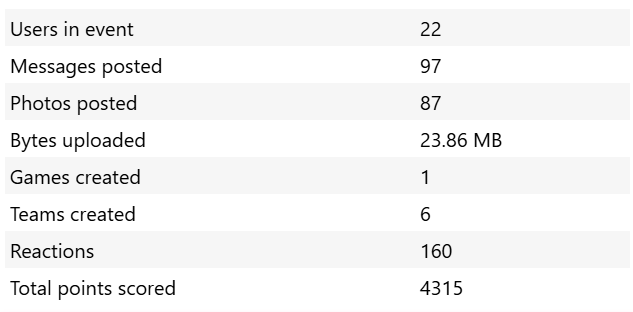
Before the user deletes something, I want to display all the connected things that will also be deleted. So I made a statistics component that does that.

The benefit is that I can also use this component to display user and event statistics:

image

Read more →


Refactor Infrastructure

 v0.6.44Avatar of adikhoffadikhoffAug 11, 2026, 5:39:18 AM

As we develop, we sometimes gain new insights in how things should be arranged. For some, these insights are inspired by conversations with peers, sudden moments of clarity, or divine inspiration. For me, my insights come from being annoyed.

One of my chief design goals has always been to minimize server configuration. My app should be deployable to a random, clean server without having to install a bunch of things. The only exception is Docker (which is already pre-installed on many VPS products), because I make extensive use of docker compose.

This meant that I could not install a central proxy/load-balancer on the server. It had to be part of the Docker arrangement. So I used Caddy inside a docker.

Last year's situation

  • production (docker compose)
    • Caddy, exposed ports 80:443
      • TLS for all domains and subdomains
      • reverse proxies to frontend and backend, internal network
      • reverse proxies to develop frontend and backend, through exposed ports
    • frontend
    • backend
    • Postgres database
  • develop (docker compose)
    • frontend, exposed port
    • backend, exposed port
    • Postgres database

Another rule I have is that the docker-compose.yml must be identical for all environments: local, develop, production. I accomplish this by putting many vars in docker-compose.yml, that are automatically loaded from the .env file (which is obviously different in each environment). For example, I disabled Caddy in develop with something like this:

  caddy:
    image: caddy:latest
    deploy:
      replicas: ${CADDY_INSTANCES:-1}

Then you can add CADDY_INSTANCES=0 to your .env and Caddy is gone.

At this time, I had not yet figured out how to configure a setup without exposing ports. But I knew it was suboptimal and it was driving me nuts. Then one day, I found out that docker networks could be shared between different docker-compose groups.

Read more →


Video support and Scrolling Menu

 v0.6.41Avatar of adikhoffadikhoffAug 9, 2026, 11:44:40 AM

I improved the menu to scroll between articles and wanted to show a video of it.

Github Releases supports video but it's a little idiosyncratic. When you drop a video into the editor, it uploads it and then resolves to a simple text URL. When you preview the release in Github, it magically becomes a video player, presumably because Github can derive the file type from the meta data it saved with the upload. I don't have this meta data so we need something clever.

Read more →


Automatic blog updates with Git Webhooks

 v0.6.40Avatar of adikhoffadikhoffAug 8, 2026, 6:26:29 PM

I was executing cURL requests to download release data from Github, manually saving images to the project, and committing the result to the repository. This manual labor quickly became annoying, especially because it takes a while before changes go to production.

So I asked AI to create a script that does the work for me, that can run in NodeJS. It took a few tries before it understood the problem with private repositories: you have to download the full json+html version (Accept: 'application/vnd.github.full+json') to get the proper image links.

I made it so the script runs at startup. But I don't want to restart the frontend every time I change a release.

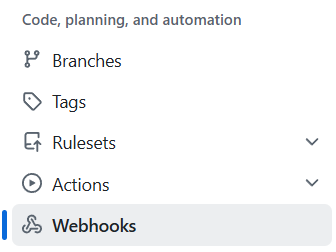
Add Webhook

image

In Github, you can define webhooks for a variety of things. I created one for releases, and pointed it at https://photopaste.com/webhooks/github-release. This means Github sends a POST request to the specified URL whenever something changes in releases.

Read more →


  • Moving towards Cloud storage
  • Add event and user statistics
  • Refactor Infrastructure
  • Add QR code to mobile
  • Video support and Scrolling Menu
  • Automatic blog updates with Git Webhooks
  • Add sliding sidebar menu to mobile home page
  • I've been doing WebFlux wrong
  • Implement Blog
  • Migrating event urls
  • Interesting bug
  • Dynamic social media badges
  • Improving Games and Teams
  • Blue Green deployments
  • Why I left the big cloud
  • Moving from AWS Amplify to Google Firebase
  • First version

Add sliding sidebar menu to mobile home page

 v0.6.36Avatar of adikhoffadikhoffAug 6, 2026, 11:26:15 AM

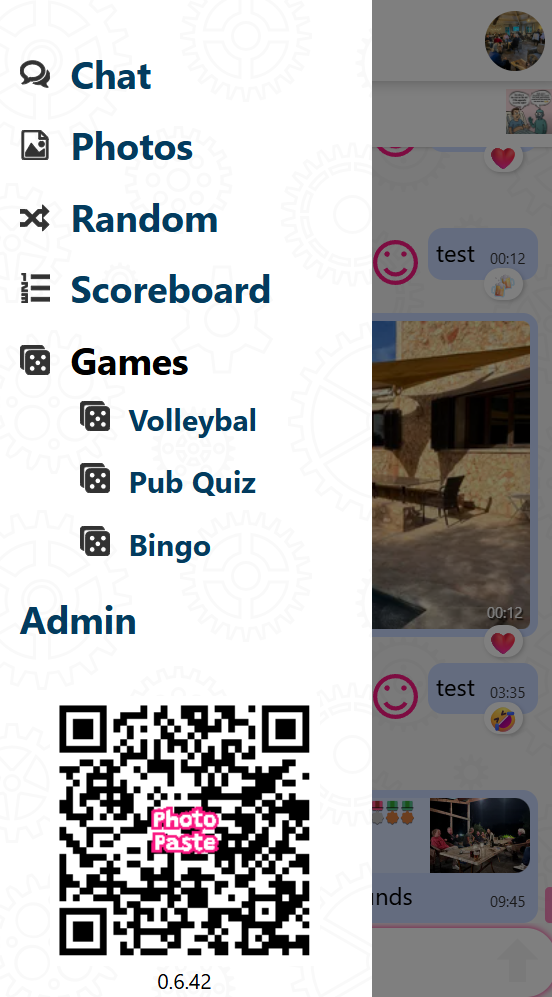
With the addition of the develop blog to the homepage, and with more pages planned, I needed the mobile version of the home page to have a vertical 'hamburger' menu. I've already done a version of this in the mobile event app, so instead of copy/pasting, let's see if we can do this the right way.

The mobile app version:

The original sidebar HTML:

    <div class="sidebar" id="sidebar" [class.open]="showMenu">
        <ul class="main-menu">
            <li><a [routerLink]="['chat']">
                <app-svg-icon name="icon-bubbles4" class="icon"></app-svg-icon>
                {{ 'menu.chat' | translate }}</a></li>
            <li><a [routerLink]="['gallery', 'bydate']">
                <app-svg-icon name="icon-file-picture"
                              class="icon"></app-svg-icon>
                {{ 'menu.photos' | translate }}</a></li>
            <li><a [routerLink]="['gallery', 'random']">
                <app-svg-icon name="icon-shuffle" class="icon"></app-svg-icon>
                {{ 'menu.random' | translate }}</a></li>
...
        </ul>
        <div class="menu-footer">
            @if (logoSrc$ | async) {
                <img [src]="logoSrc$ | async" class="logo" alt="PhotoPaste logo">
            }
            <div class="version">
                {{ frontendVersion }}
            </div>
        </div>
    </div>

I noticed that the menu part was really just a bunch of routerLinks. No complex logic or trickery. This is an opportunity to extract the menu logic, CSS and animations to a separate, generic, component.

Read more →


I've been doing WebFlux wrong

 v0.6.35Avatar of adikhoffadikhoffAug 3, 2026, 4:29:47 PM

I don't know how this started, but I've been using this kind of construction pretty much everywhere.

    @GetMapping("/products")
    public Mono<ResponseEntity<Flux<Product>>> getProducts() {
        Flux<Product> productFlux = products.findAll();
        return Mono.just(ResponseEntity.ok(productFlux));
    }

It's a case of trying many things until it works, and then keep doing it. I was investigating a non-related bug and came across a much cleaner way of doing things. I thought WebFlux needed the Mono and ResponseEntity to send a proper HTTP response. Turns out it doesn't.

    @GetMapping("/products")
    public Flux<Product> getProducts() {
        return products.findAll();
    }

This works just fine.

Read more →


Implement Blog

 v0.6.34Avatar of adikhoffadikhoffAug 3, 2026, 8:25:51 AM

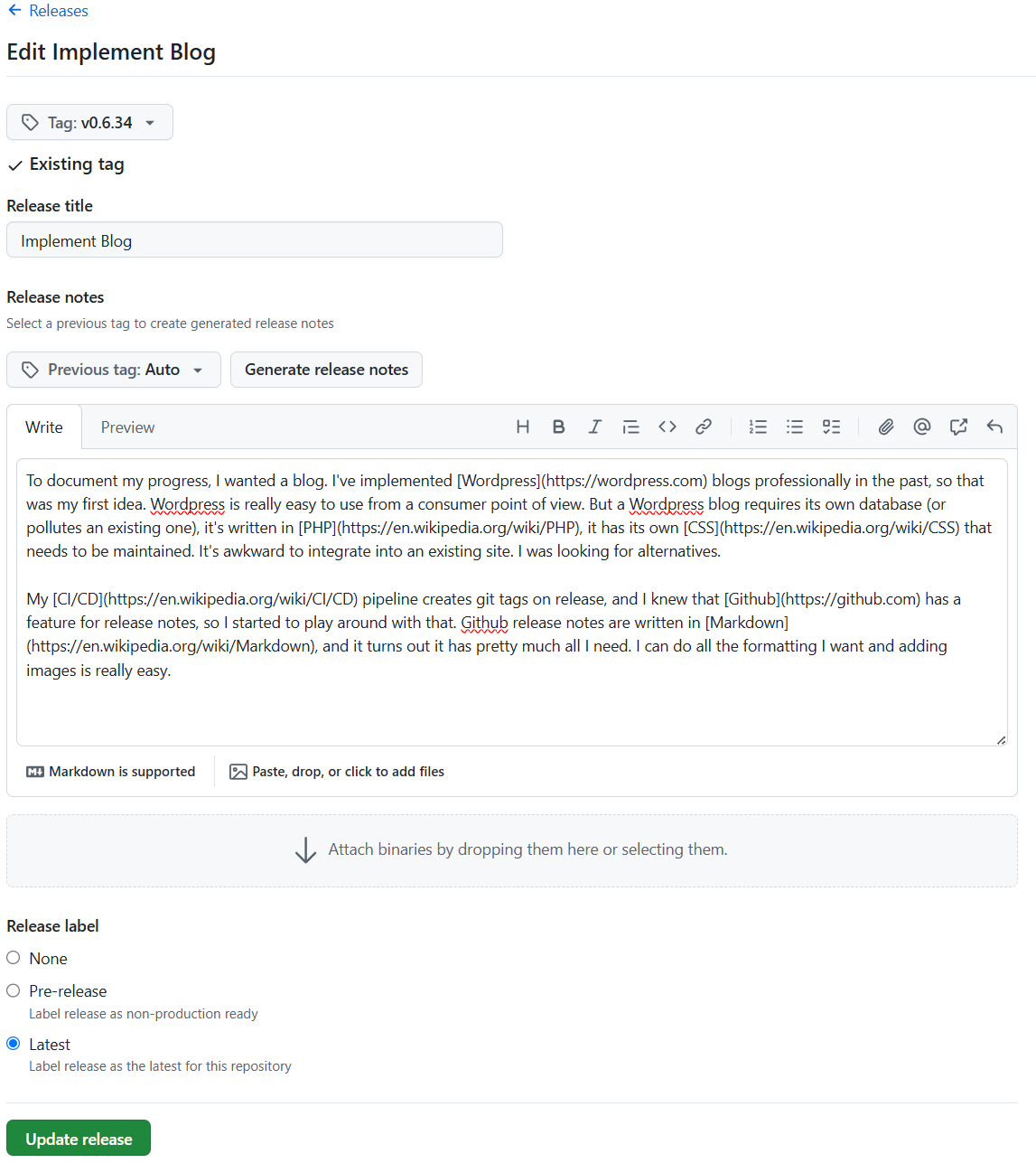
To document my progress, I wanted a blog. I've implemented Wordpress blogs professionally in the past, so that was my first idea. Wordpress is really easy to use from a consumer point of view. But a Wordpress blog requires its own database (or pollutes an existing one), it's written in PHP, it has its own CSS that needs to be maintained. It's awkward to integrate into an existing site. I was looking for alternatives.

My CI/CD pipeline creates git tags on release, and I knew that Github has a feature for release notes, so I started to play around with that. Github release notes are written in Markdown, and it turns out it has pretty much all I need. I can do all the formatting I want and adding images is really easy.

image

Read more →


Migrating event urls

 v0.6.32Avatar of adikhoffadikhoffJul 31, 2026, 11:41:35 AM

Up until this point, My sense of aesthetics was stubbornly insisting on this URL structure:

https://photopaste.com/[event_slug]

instead of

https://photopaste.com/event/[event_slug]
https://photopaste.com/e/[event_slug]
https://events.photopaste.com/[event_slug]

... and I got away with it for years. If you define every other route before reaching the wildcard, it works pretty well. Catch everything in a wild card, make a call to the database to see if the event exists, then show the event. If it doesn't then show the 404.

Unfortunately this also means that everything that should be a 404 leads to an unnecessary DB call, which irritates my sense of efficiency.

Read more →